Basic functions
In this section, we will explain the buttons and check boxes.
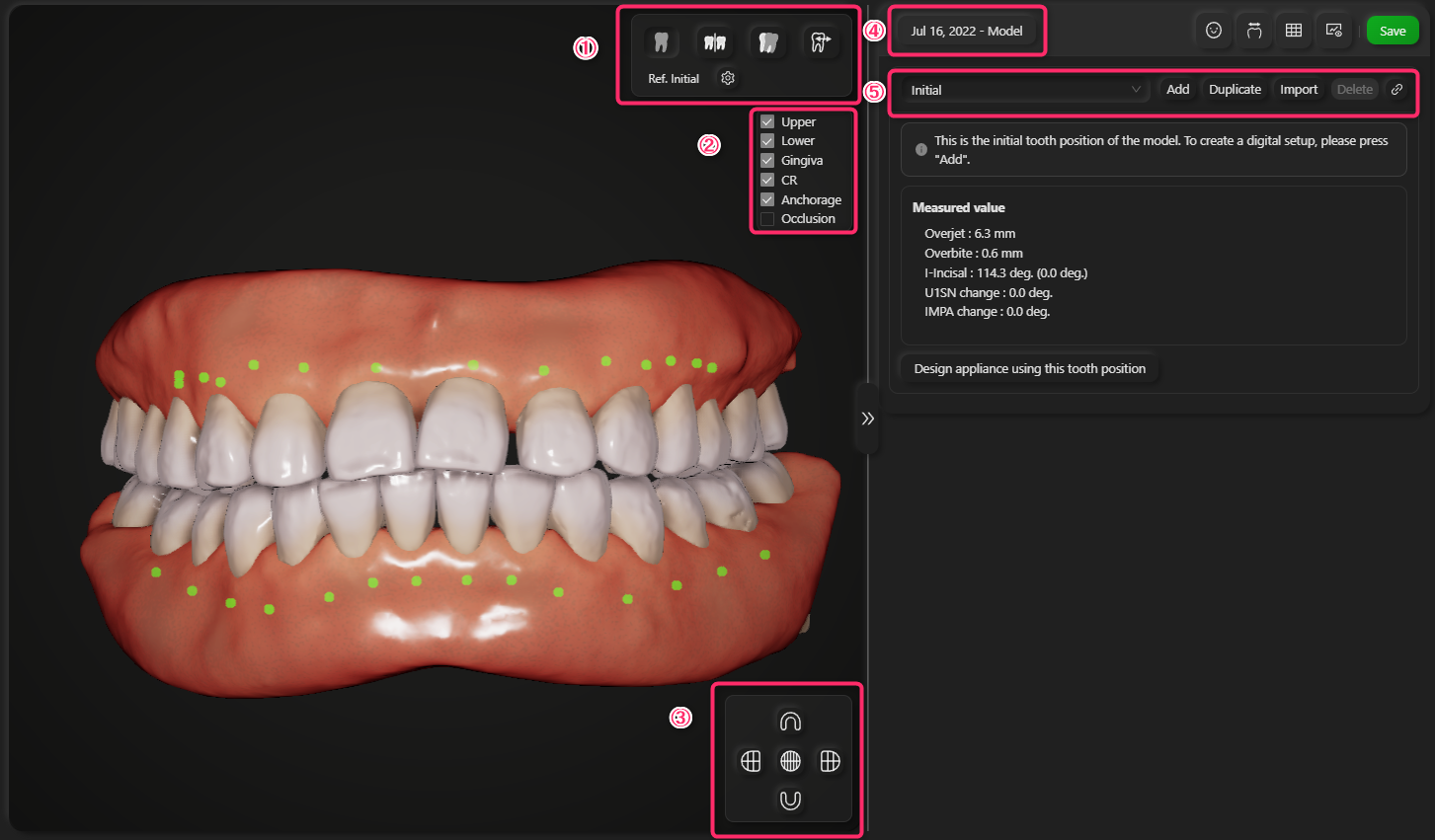
Mouse operation
- Left drag: Rotate the view
- Shift + left drag: Pan the view
- Mouse wheel: Zoom in/out
1. View mode buttons
Buttons to switch view mode
- Single view: Show the current tooth position only
- Split: Show the current tooth position and a reference position side by side
- Superimposition: Superimpose the current tooth position and a reference position
- Movement: Show movement between the current tooth position and a reference position
By default, the reference position is the initial tooth position of the model. You can change it by clicking the setting button.
2. View component selector
Checkboxex to show/hide each view component
Face, Bone and CT Volume will be shown if they are registered.
3. Preset view buttons
Buttons to move the camera to the preset positions
4. Model selector
Button to select the model date to be shown
5. Setup manager
Selector and buttons to manage digital setup.
- Add: Create new setup
- Duplicate: Duplicate the selected setup
- Import: Import setup from other model date
- Delete: Delete the selected setup